This article explains not only how to use Amazon Japan while traveling in Japan, but also how to shop on Amazon Japan from your home overseas.
Your luggage is starting to pile up during your trip to Japan.
Maybe you need a new bag or suitcase, but you don’t want to spend valuable sightseeing time going from store to store.
Or maybe there’s something you suddenly need during your trip—or something you couldn’t find in a shop—and you want to order it from Amazon Japan (Amazon.co.jp).
That can happen.
But if you don’t live in Japan, you may be wondering:
“Can I even order from Amazon Japan?”
“I don’t have a Japanese home address. Where can I have my order delivered?”
The short answer is: yes, you can shop on Amazon Japan while traveling in Japan.
Amazon Japan can also be viewed in English.
And you don’t need your own home address in Japan to receive an order.
You can have packages delivered to your accommodation, or pick them up at convenience stores, Amazon Lockers, and other pickup locations.
So for travelers, the most important question is:
“Where am I going to receive my order?”
In this guide, I’ll walk you through how to order from Amazon Japan and actually receive your package while you’re traveling.
- Where travelers can receive Amazon orders
- What to check before sending a package to your accommodation
- How to use convenience stores and Amazon Lockers
- How to create an Amazon Japan account
- How to use Amazon Japan in English
- What to know about payment

Japan has other online shopping sites, including Rakuten Ichiba and Yahoo! Shopping.
But if you’re only visiting Japan for a short time, Amazon Japan is a good place to start.
You can have orders delivered to your accommodation or pick them up at convenience stores and Amazon Lockers, which makes it practical for travelers.
I’ll also explain how to pay at a convenience store if you don’t want to use a credit card.
You Can Shop on Amazon Japan While Traveling in Japan
Amazon Japan isn’t only for people who live in Japan.
Travelers can place an order and receive it while they’re still in the country.
You can also switch Amazon Japan to English, which makes the site much easier to use if you don’t speak Japanese.
Just keep in mind that not every page or message will necessarily appear in English.
Some product descriptions or messages from sellers may still be shown in Japanese.
Before you buy anything, make sure you check the product details and size carefully.
Decide Where You’ll Receive Your Order First
Before you start shopping on Amazon Japan, it helps to answer one question:
“Where am I going to receive the package?”
For most travelers, a simple way to decide is:
- Ask whether your accommodation can accept Amazon or other delivery packages
- If it can, have the order delivered there
- If it can’t, check nearby convenience stores and other pickup locations
- For smaller, lighter items, also consider an Amazon Locker
If your hotel, ryokan, guesthouse, or other accommodation can accept an Amazon package for you, that’s usually the easiest option.
If not, check nearby convenience stores first.
For smaller and lighter items, Amazon Lockers are also useful.
Have Your Order Delivered to Your Hotel, Ryokan, or Guesthouse
If your accommodation accepts parcels and Amazon deliveries, you can use its address as your shipping address.
Hotels and ryokan may accept packages, and some guesthouses and hostels may also hold parcels for guests if staff are available.
However,
whether your accommodation will accept a package is entirely up to that property.
Guesthouses and hostels in particular may not have staff on site all the time.
Just because Amazon lets you enter the accommodation’s address doesn’t mean the property will automatically accept your package.
Before ordering, ask something like:
“Can I have an Amazon package delivered here during my stay?”
“Can you hold the package for me if it arrives before I check in?”
If the property gives you specific instructions for how to write the address or guest name, follow them.
If your accommodation asks you to include your reservation number or check-in date, you can enter them together with the hotel name in the “Building / Company Name / Room Number” field on Amazon Japan.
Otherwise, a package may arrive and the staff may be left wondering:
“Who is this for?”
That creates unnecessary trouble for the accommodation too.
For Vacation Rentals or Self Check-In Properties, a Pickup Location May Be Easier
At vacation rentals and self check-in accommodations, there may be no staff available to receive a package.
Even if the building has delivery lockers, that doesn’t necessarily mean short-term guests are allowed to use them.
If your host or accommodation has not clearly told you,
“Yes, you can have Amazon packages delivered here,”
it’s better not to send a package there without asking.
In that case, a convenience store, Amazon Locker, or another pickup location is usually simpler.
How to Pick Up Amazon Orders at Convenience Stores or Amazon Lockers
In Japan, Amazon offers pickup options that let you receive orders somewhere other than a home address.
Depending on the item and location, you may be able to use a convenience store, Amazon Locker, or another pickup point.
According to Amazon,
- Amazon Lockers are installed across Japan
- There are more than 40,000 pickup locations in total, including Amazon Lockers and convenience stores
For travelers, the big advantage is that
you still have somewhere to receive your package even if your accommodation can’t accept deliveries.
If you choose a convenience store or Amazon Locker close to where you’re staying, you can pick up your package at a convenient time, such as on your way back after sightseeing.
If your accommodation can’t accept deliveries, I recommend checking nearby convenience stores first.
They’re easy to find in many parts of Japan, and they can accept larger or heavier packages than Amazon Lockers in some cases.
You Can Pick Up Amazon Orders at Convenience Stores
Some Amazon Japan orders can be sent to a convenience store for pickup.
When placing your order, select the convenience store where you want to receive it.
However, not every item is eligible.
According to Amazon, convenience store pickup is available only when the order meets the applicable conditions.
The item must be shipped by Amazon.co.jp.
It is not eligible for convenience store pickup if:
- It is an Amazon Subscribe & Save order
- You selected scheduled delivery
- The item costs ¥300,000 or more
- The total of the length, width, and height exceeds 80 cm
- The package weighs more than 10 kg
- It contains hazardous materials marked as “Keep Fire Away”
- The product page says it is temporarily out of stock and the restock date is unknown
Compared with Amazon Locker, convenience store pickup can still work for larger items.
Amazon Locker is limited to packages under 4.5 kg and smaller than 42 × 32 × 25 cm.
The easiest way to check is simple:
when placing your order, see whether a convenience store can be selected as the pickup location.
If the item isn’t eligible, that option won’t be available.
Once your package arrives at the convenience store, Amazon will send you an email saying it’s ready for pickup.
You can then use the barcode, pickup code, or other information in that email to collect your order.
The exact procedure depends on the convenience store.
- Lawson: Show the barcode at the register, or use a Loppi terminal
- FamilyMart: Show the barcode at the register, or use a multi-copy machine
- MINISTOP: Use a Loppi terminal to print a pickup slip, then take it to the register
You can check the official convenience store websites for more detailed instructions.
7-Eleven accepts Amazon convenience store payments, but it does not offer Amazon package pickup, so don’t confuse the two services.
Also pay attention to the pickup deadline.
At Lawson, MINISTOP, and FamilyMart, Amazon orders are held for four days from the delivery completion date.
If you miss the deadline, the package will be returned to Amazon and the order will be canceled.
If you already paid, the payment will be refunded.
Travel plans can change, so when Amazon sends you the “ready for pickup” message, check the pickup deadline in the email as well.
Once your package arrives at the convenience store, don’t delete the email Amazon sends you.
It contains the barcode or pickup code you’ll need to collect your order.
Check the pickup deadline too, and make sure you collect it before it expires.
Amazon Locker Is Useful for Small, Light Items
Amazon Locker is Amazon’s self-service pickup locker service.
When you place your order, choose the Locker where you want the package delivered.
Amazon will send you pickup instructions once the item arrives.
Depending on the Locker, you may:
- Use a pickup code or barcode
- Open the Locker through the Amazon Shopping app using Bluetooth
One big advantage of Amazon Locker is that
you can pick up your package without needing to speak to store staff.
That can be useful if you’re worried about communicating in Japanese.
However, because it’s a locker, there are stricter size limits.
Amazon Locker: How to Use It and Three Ways to Find a Location
Not Every Item Can Be Sent to an Amazon Locker
This is important.
Just because there’s an Amazon Locker nearby doesn’t mean every product can be delivered there.
Amazon Locker orders have size, weight, and other eligibility requirements.
The main conditions include:
- The item must be shipped by Amazon Japan
- Shipping weight must be under 4.5 kg
- The package must be smaller than 42 × 32 × 25 cm
- It cannot be an Amazon Subscribe & Save order
- It cannot contain hazardous materials
If an item doesn’t meet the requirements, you won’t be able to select that Locker as the delivery destination when placing your order.
Large suitcases and heavy products, for example, cannot be delivered to an Amazon Locker.
If your accommodation can’t receive your package, check convenience stores or another pickup option instead.
Amazon Locker Holds Packages for Three Days
This is especially important when you’re traveling.
Amazon Locker packages are held for
three days, including the day they are delivered to the Locker.
If you don’t collect the package within that period, it will be returned to Amazon and your payment will be refunded.
So you can’t do something like:
“I’ll order it a week before I arrive in Japan and leave it in the Locker until I get there.”
On the other hand, I also wouldn’t recommend ordering something that is supposed to arrive on the morning you fly home.
Deliveries can be delayed.
If you’re using Amazon Japan during your trip, give yourself some extra time both for delivery and pickup.
Check the Opening Hours of the Building Where the Locker Is Located
Some Amazon Lockers can be accessed 24 hours a day.
But if a Locker is inside a supermarket, drugstore, shopping center, or another building, you won’t be able to reach it after that building closes.
If you plan to pick up your package at night,
check the opening hours of the building where the Locker is located—not just the Locker itself.
How to Create an Amazon Japan Account and Place an Order
Once you’ve decided where you’ll receive your order, you can create an Amazon Japan account and start shopping.
There’s no special ordering process just because you’re traveling.
Here’s the basic flow:
- Create an Amazon account or sign in
- Change the language and display currency if needed
- Choose the item you want
- Check the estimated delivery date
- Select your accommodation, convenience store, Amazon Locker, or another pickup point as the delivery destination
- Choose a payment method and place the order
- If you selected convenience store payment, go and pay
- Once the package arrives, collect it from the location you selected
Now let’s go through the actual screens.
Create an Amazon Account
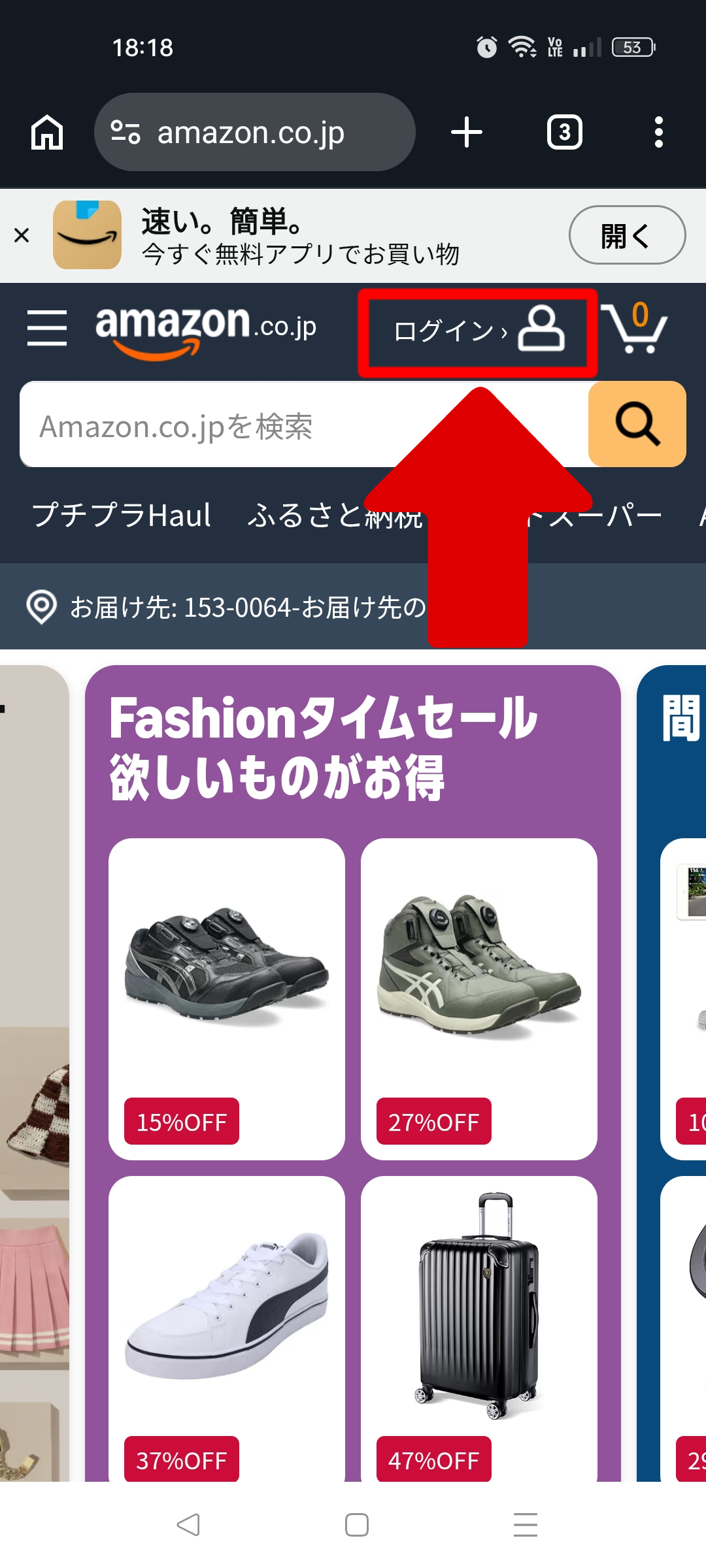
① Go to Amazon Japan and tap “Sign in”
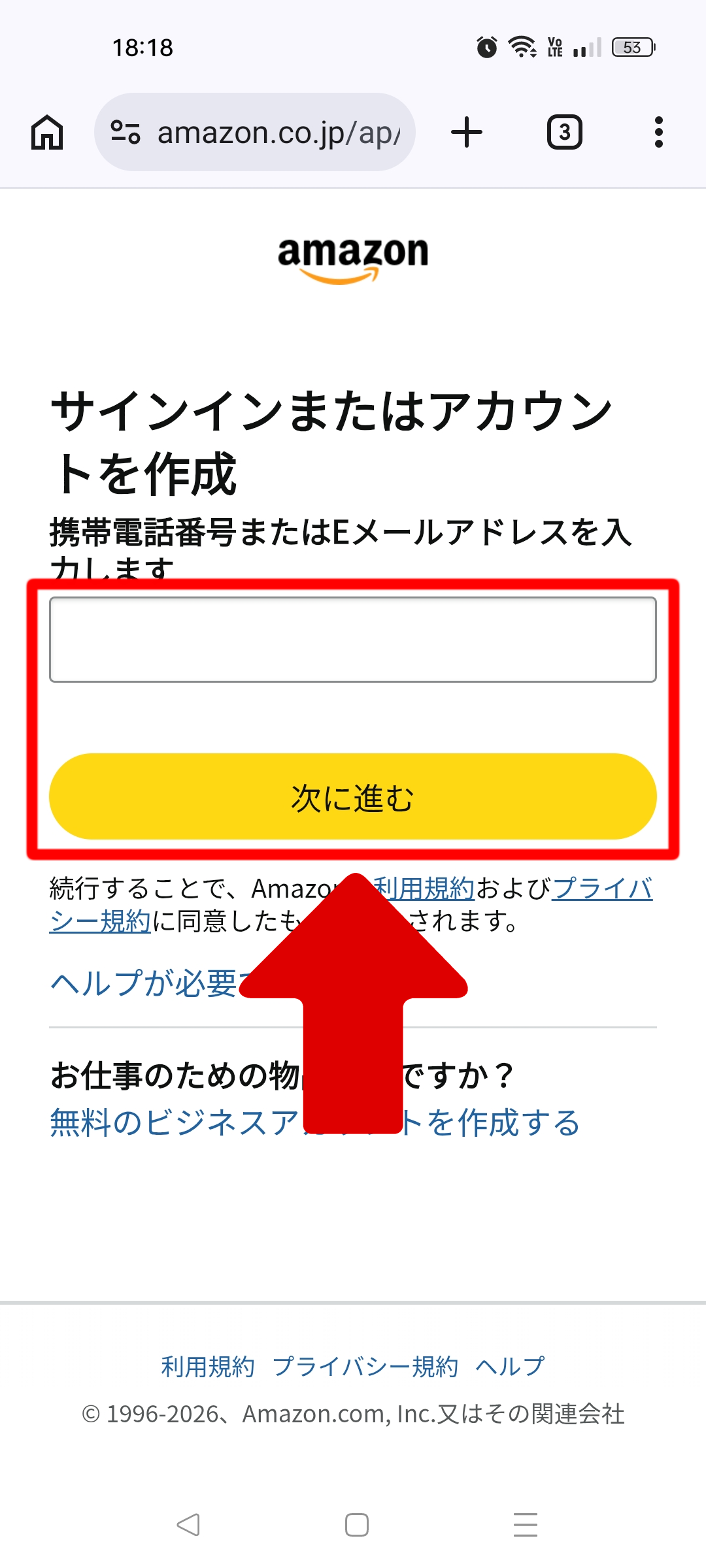
② Enter your email address or mobile phone number and tap “Continue” to register. Create a password and sign in
③ Next, change the language and display currency settings
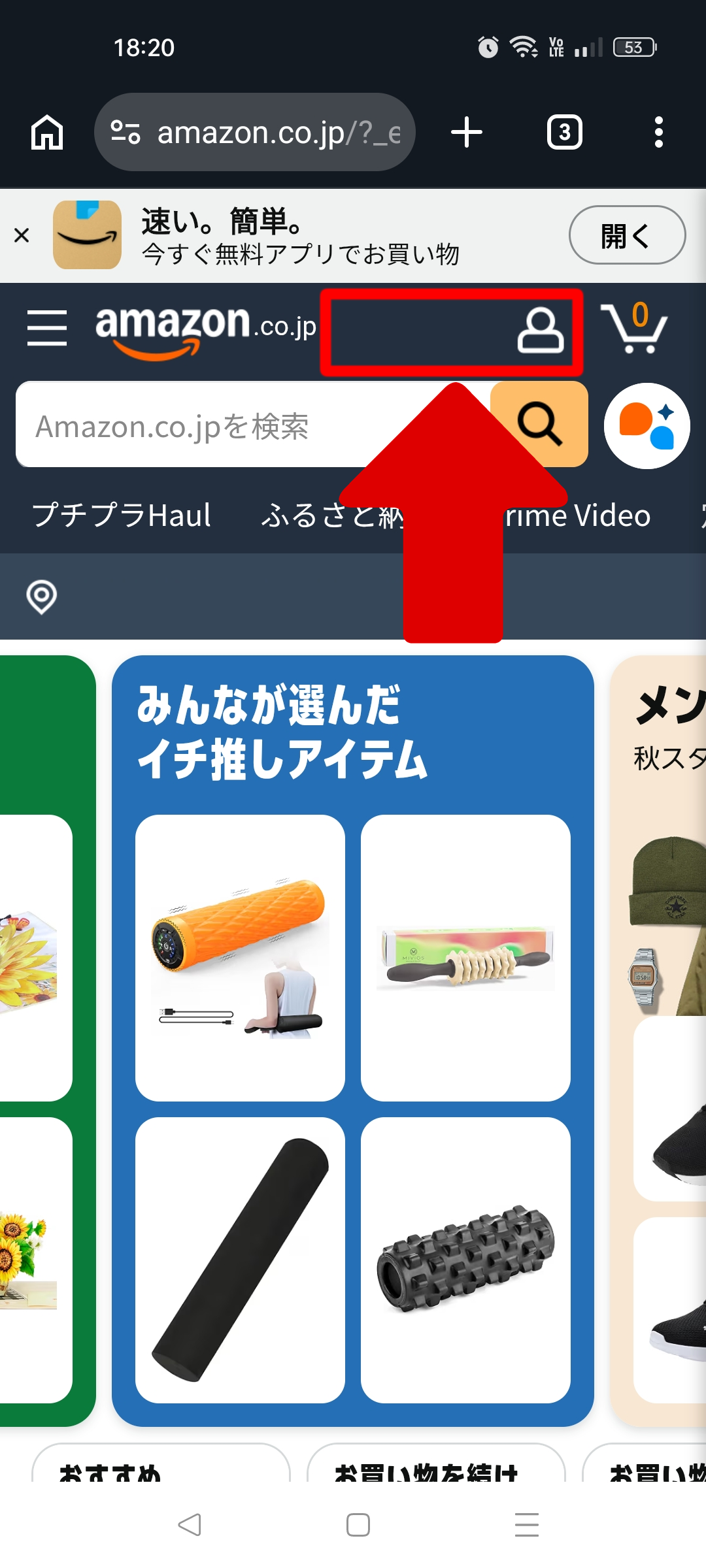
④ You can choose from several display currencies. Keep “Japan” selected in the middle setting because you’re using Amazon while in Japan
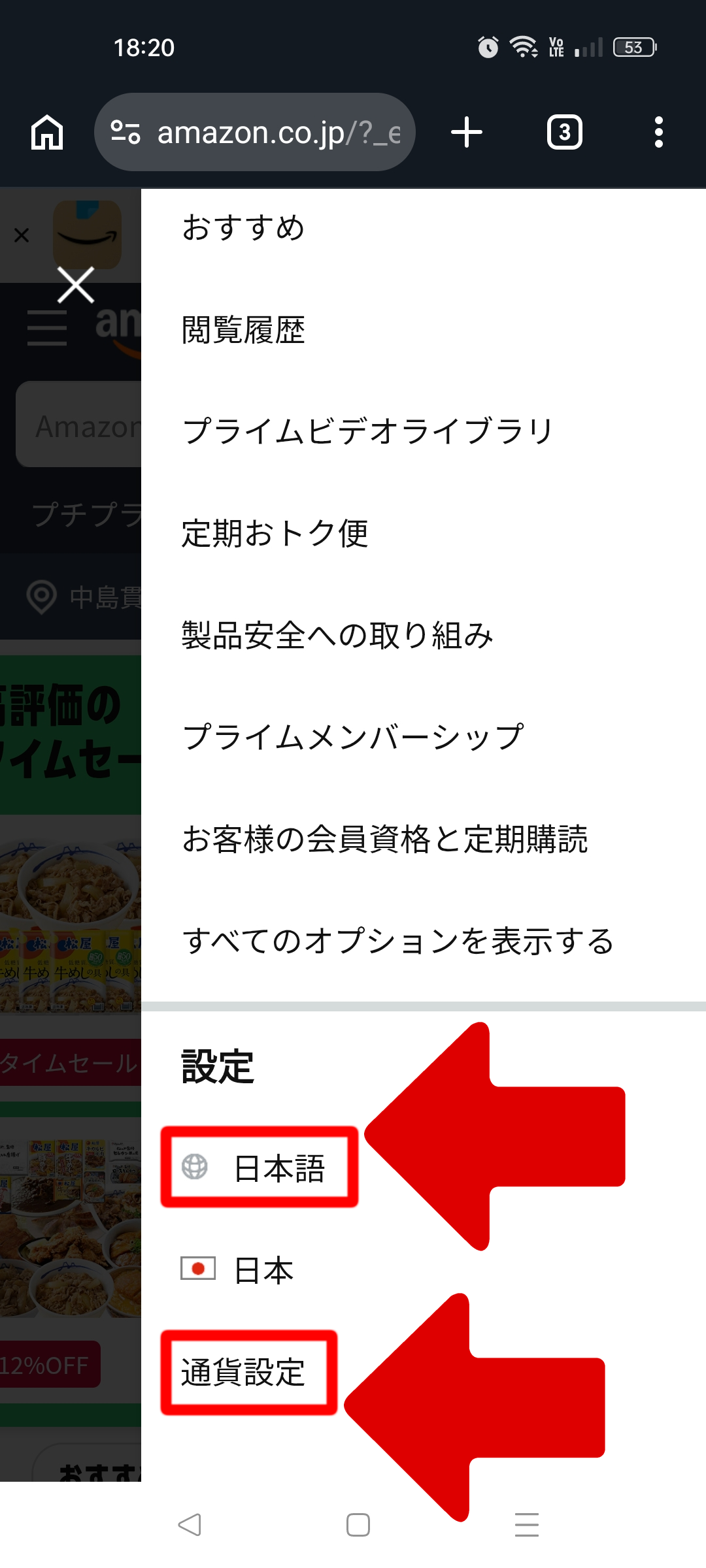
⑤ Add the item you want to your cart and proceed to checkout. Set your delivery address and payment method
You may be worried about entering a Japanese address, but you can add a Japanese keyboard to your smartphone if necessary.
An easier option is to copy the address directly from your accommodation’s official website and paste it into Amazon.
A Roman-alphabet address may still work, but if you’re sending the order to a hotel or another accommodation, using the address format provided by that property is the simplest option.
Double-check the postal code and guest name too.
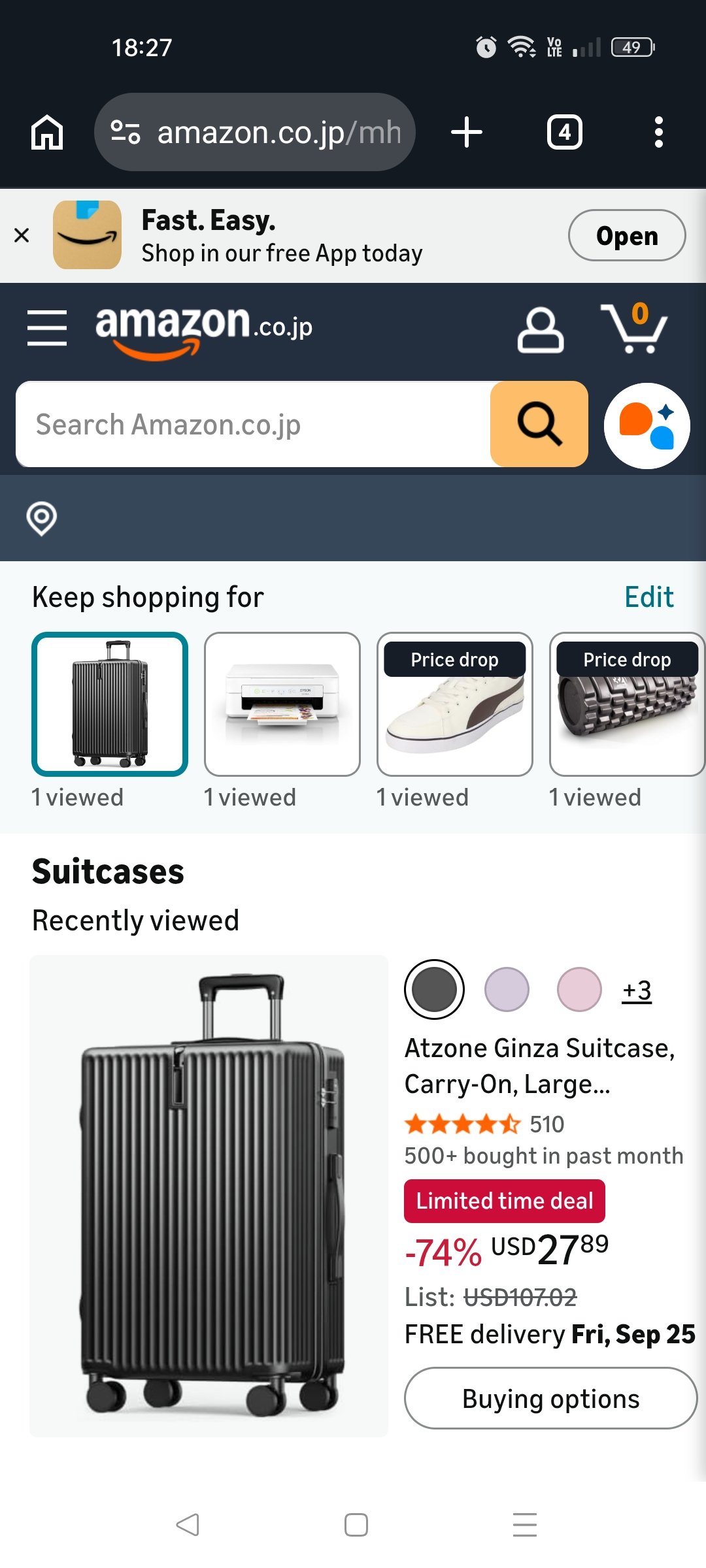
⑥ One thing to watch for when ordering from Amazon Japan
During checkout, Amazon may invite you to sign up for Amazon Prime.
For items shipped by Amazon Japan, standard delivery is generally free when your order total is at least ¥3,500.
However, if it’s your first purchase on Amazon Japan, standard delivery is free regardless of the order amount.
Prime members can also use delivery benefits such as expedited shipping and scheduled delivery on eligible items.
Amazon Prime costs ¥600 per month or ¥5,900 per year.
Eligible customers may see a 30-day free trial offer.
If you use the free trial during a short trip, check the renewal date so you don’t accidentally continue into a paid membership.
If you don’t need Prime, you can simply continue your purchase without joining.
Amazon Japan | How to Cancel Your Prime Membership
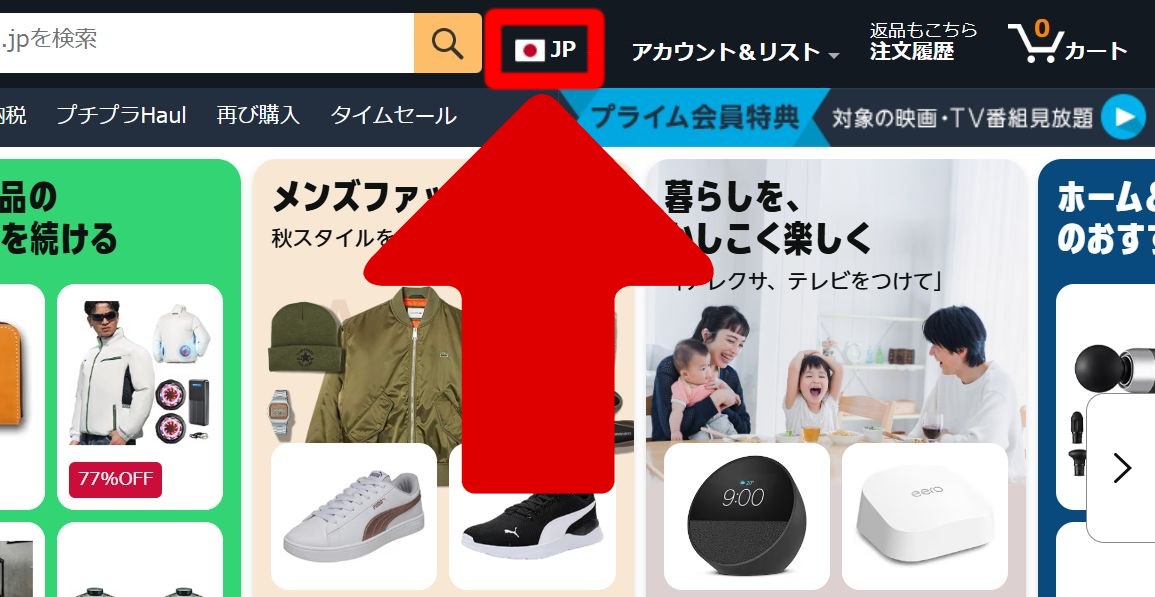
⑦ If you’re using Amazon Japan on a computer instead of a smartphone, the settings are easy to find. You can change the language and display currency from the flag icon
Amazon Prime Can Be Useful for Delivery During Your Trip
If you’re using Amazon while traveling in Japan, the most useful Prime benefit is probably delivery.
Prime members can use expedited shipping and scheduled delivery on eligible items at no extra charge.
That can be helpful when you’re thinking:
“I’m only in Japan for a limited time, so I’d like to receive this as soon as possible.”
Not every product or area is eligible, so always check the estimated delivery date before ordering.
Amazon Prime also includes benefits such as Prime Video, Amazon Music Prime, and Prime Reading, but for a short trip to Japan, the delivery benefits are probably the first thing worth checking.
You Can Also Pay for Some Amazon Japan Orders at a Convenience Store
For some orders, convenience store payment is available as an alternative to paying by credit card.
This lets you pay using cash and other supported payment methods.
Don’t make the mistake of choosing convenience store payment and thinking:
“I’ll just pay when the package arrives at the convenience store.”
Convenience store payment is a prepayment method.
Amazon won’t ship the item until your payment has been completed.
The payment procedure differs by convenience store.
When Amazon sends you the payment email, follow the instructions for the store you want to use.
Convenience store payment isn’t available for every product or delivery method.
You can use it when “convenience store payment” appears as an option during checkout.
Amazon Japan Can Also Help When You Can’t Find Something in Stores
Amazon Japan isn’t only useful when you need something delivered during your trip.
You may arrive in Japan and think:
“I wanted to buy this manga, but the store didn’t have it.”
“The figure I wanted is sold out.”
“I really don’t want to visit five different stores looking for this…”
That happens too.
In that situation, checking Amazon Japan is another option.
Your time in Japan is limited.
Instead of visiting store after store looking for the same item,
you could check whether Amazon has it in stock and have it delivered to your accommodation or a nearby convenience store.
On the other hand, if you need something
“right now,”
it may be faster to buy it from a nearby convenience store, drugstore, electronics store, or another local shop instead of waiting for Amazon.
Amazon product pages show an estimated delivery date.
Even if Amazon says an item will arrive on a certain day, delivery can still be delayed.
If you know you want something, order it while you still have plenty of time left in Japan.
Returns Can Be a Hassle When You’re Traveling
Even if an item you bought from Amazon Japan is eligible for return, you only have a limited amount of time in Japan.
You’ll need to follow Amazon’s return procedure.
So be especially careful before ordering:
- Clothes or shoes where choosing the right size matters
- Accessories for smartphones, cameras, or other devices
- Products where it’s easy to choose the wrong model or version
Imagine your order arriving the day before your flight home and realizing:
“I bought the wrong one… and I’m leaving tomorrow…”
That would be a hassle.
If there’s something you know you want or need, it’s better to order it earlier in your trip.
Amazon Returns & Refunds (Returns from Overseas Are Also Possible)
What Should You Do With Your Amazon Japan Account After You Leave Japan?
If you created an Amazon Japan account specifically for your trip, you may wonder:
“Should I delete my account after I go home?”
You don’t have to delete your Amazon Japan account just because you’ve left Japan.
Some products on Amazon Japan can be shipped internationally.
So even after you return home, you may still be able to shop on Amazon Japan and have eligible products delivered to your home address.
If you want to keep using the account, start by changing the delivery address to your home address.
International Shipping from Amazon Japan
International Shipping Fees | Amazon Japan
Free International Shipping | Amazon Japan
Using Amazon Japan During Your Trip: The Simple Checklist
Here’s the whole process one more time.
For most travelers, this is enough:
- First, ask whether your accommodation can accept packages
- If it can’t, check nearby convenience stores and other pickup locations
- For smaller, lighter items, consider an Amazon Locker
- Find the item you want on Amazon Japan
- Make sure it will arrive while you’re still in Japan
- Check the pickup location, pickup deadline, and your travel schedule before placing the order
You can use Amazon Japan even if you don’t have your own address in Japan.
No need to overthink it. ♪

If you think you might use Amazon during your trip, choose a place to stay that can accept packages for you. Woof!

Ready to plan your trip?
Find flights, hotels, transportation, tours, and attraction tickets below.
Flights
Search Flights to Japan
Hotels
Find Hotels in Japan
Airport Transfer
Book an Airport Transfer
Private Car Charter
Travel with a Private Driver
Tours & Experiences
Explore Tours in Japan
Attraction Tickets
Find Tickets in Japan

Explore tours, experiences, and attraction tickets to discover even more ways to enjoy Japan.
Why not take a look and see what’s waiting for you in Japan?