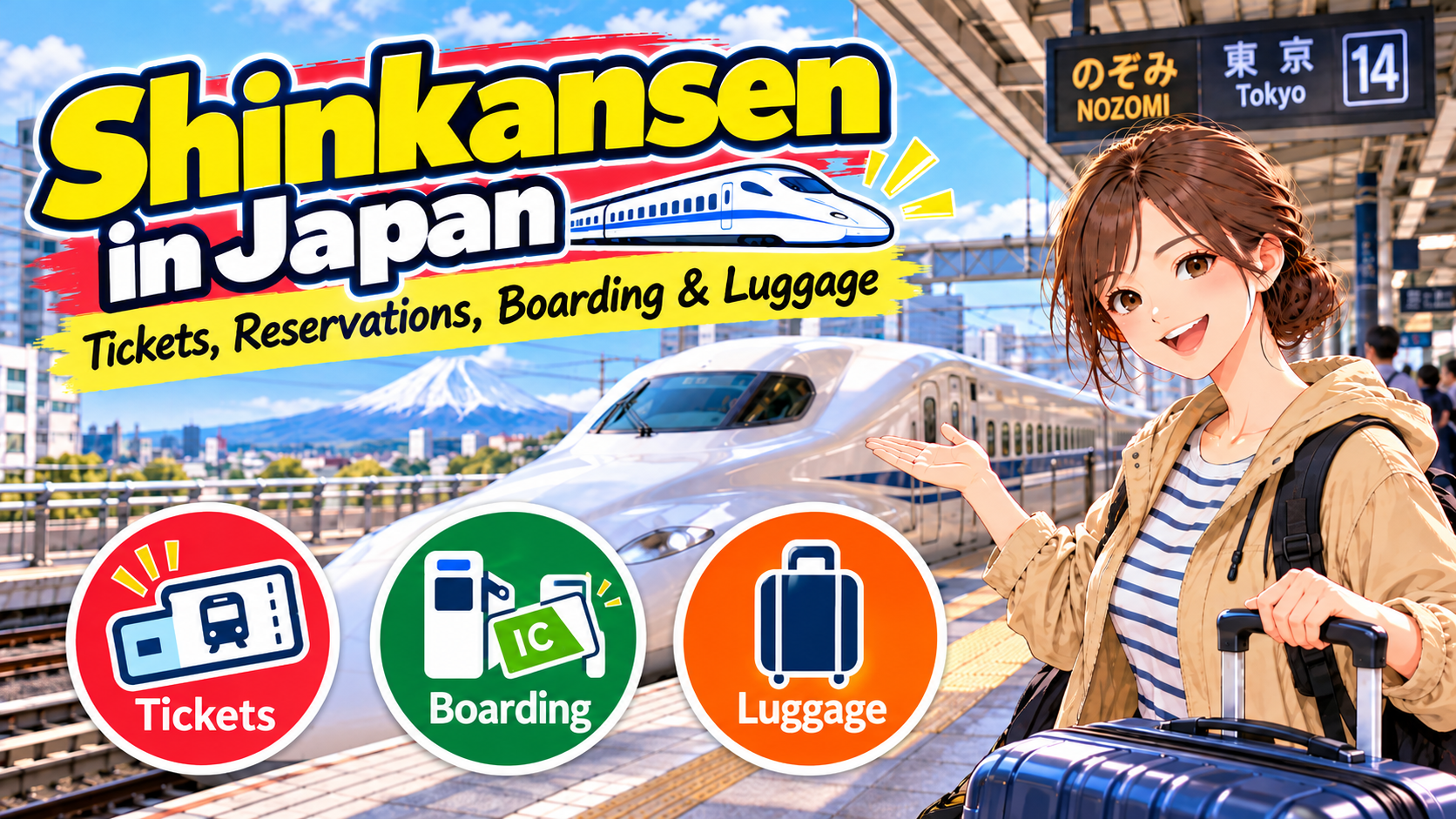
Riding the Shinkansen (Japan's bullet train) for the first time?
You might be wondering where to buy tickets, whether you need a reservation, or if you can simply tap your Suica card at the ticket gate.
The system works differently from regular trains, so it's easy to feel a little lost at first.
But the basics are simple.
Choose your route and train → Buy a ticket or make a reservation → Go through the Shinkansen ticket gate → Check your train number and car number before boarding.
On the Tokaido, Sanyo, and Kyushu Shinkansen, for example, you generally can't board just by tapping a Suica, PASMO, or ICOCA card and paying from its stored balance as you would on a regular train.
However, JR East has a separate service called "Touch de Go! Shinkansen" that lets you use your IC card balance to ride in non-reserved seating on eligible routes.
If your Shinkansen has non-reserved seats, you don't need to book in advance. You can buy a basic fare ticket and a non-reserved seat Shinkansen express ticket at a station ticket machine on the day you travel.
You can also buy a reserved seat on the day of travel if seats are still available.
However, trains such as the Hayabusa have no non-reserved cars, so you generally need a ticket with an assigned seat.
In this guide, I'll walk you through buying tickets, choosing between reserved and non-reserved seats, getting through the gates with paper tickets, QR tickets, or IC cards, and bringing a large suitcase on board.
Choose Your Shinkansen Stations and Train
Start by searching for directions from your departure point to your destination on Google Maps or a similar app.
You'll see where to board and get off the Shinkansen, the departure time, and the train name.
Your Shinkansen Station May Be Different from the Main City Station
The Shinkansen doesn't stop at every major station.
For example, Shinkansen trains serving Osaka stop at Shin-Osaka Station, not Osaka Station.
From Shin-Osaka, you can take a regular JR train or another form of transportation to Osaka Station.
If you're traveling from Tokyo toward Kyoto or Osaka on the Tokaido Shinkansen, you can board at Shinagawa Station as well as Tokyo Station.
Choose whichever station is easier to reach from your hotel.
Before buying a ticket, check the exact Shinkansen boarding and arrival stations shown in your Google Maps directions.
Osaka and Shin-Osaka are different stations. So are Yokohama and Shin-Yokohama.
Make sure you've got the right station name.
Nozomi, Hikari, and Kodama Stop at Different Stations
Even on the same Shinkansen line, different train services stop at different stations and take different amounts of time.
On the Tokaido Shinkansen between Tokyo, Kyoto, and Shin-Osaka, you'll see trains called Nozomi, Hikari, and Kodama.
Generally, Nozomi stops at fewer stations, while Kodama stops at every station.
The right one for you depends on where you're going.
Match the train name and departure time in Google Maps with the details on the booking screen or the station departure board.
Shinkansen Fares Include Two Charges: Basic Fare and Express Fare
This is one part of buying a Shinkansen ticket that can be especially confusing the first time.
In most cases, a Shinkansen journey includes two charges:
- Basic Fare Ticket (乗車券): The fare for traveling from your departure station to your destination.
- Shinkansen / Super Express Ticket (新幹線特急券): An additional charge for riding the Shinkansen. The amount depends on factors such as whether you choose a reserved or non-reserved seat.
For example, a Shinkansen trip from Tokyo to Kyoto costs the basic fare between those stations plus the Shinkansen express fare.
However, this doesn't necessarily mean you'll receive two separate paper tickets.
Sometimes the basic fare and express fare are combined into one ticket.
If you book through Smart EX, the price includes both the basic fare and the Shinkansen express fare.
You can use a QR ticket or an IC card linked to your reservation at the gates, so you don't need to buy another basic fare ticket for the same Shinkansen journey.
If your booking or purchase screen says that both the basic fare and express fare are included, don't buy a second basic fare ticket for the same route.
JR booking services offer different types of tickets, so check the total price and exactly which part of your journey it covers before paying.
Non-Reserved Seats, Reserved Seats, or Green Car?
- Non-Reserved Seat: You aren't assigned a specific train or seat. You can take an eligible train at a time that suits you, but if all seats are occupied, you'll have to stand.
- Reserved Seat: Your train, car, and seat number are assigned when you buy your ticket.
- Green Car: A higher-class car with more spacious seating and amenities than ordinary class. It costs extra.
If it's your first time riding the Shinkansen, I recommend an ordinary-class reserved seat.
You'll know your car and seat number before boarding, so you won't have to walk through the train looking for an empty seat.
It's also a good choice if you want to sit next to family or friends.
If you'd rather save money, a non-reserved seat is another option. Just remember that some trains, including Hayabusa and Kagayaki, have reserved seats only.
The Nozomi on the Tokaido and Sanyo Shinkansen also operates with reserved seats only during certain busy periods, such as the New Year holidays and major holiday weeks.
If you want a non-reserved seat, check whether "Non-Reserved Seat" is available in the booking options.
You can check the dates when Nozomi operates with reserved seats only on the official JR Central website (English).
Do You Need to Reserve a Shinkansen Ticket in Advance?
Advance reservations aren't required for every Shinkansen train.
If a train has non-reserved seats, you can buy the appropriate ticket at the station on the day you travel.
You can also buy a reserved seat on the same day if one is available.
However, if you're taking a reserved-seats-only train, you'll need a ticket valid for that service. Seats can also sell out during Japan's major holiday periods, including Golden Week, Obon, Silver Week, and the New Year holidays.
If you already know your travel date and time, booking a reserved seat early is a good idea.
Generally, JR reserved seats go on sale at 10:00 a.m., one month before the travel date.
Smart EX also offers some bookings up to a year in advance, but bookings made more than one month ahead have conditions regarding when the train and seat are confirmed.
Where to Buy Shinkansen Tickets and Make Reservations
The main options are reserved-seat ticket machines, staffed ticket offices, and the online reservation services operated by JR companies.
1. Buy Tickets at a Station Ticket Machine
This is a good option if you don't want to create an online account or would rather buy your tickets after arriving in Japan.
Major JR stations have Reserved Seat Ticket Vending Machines that sell Shinkansen tickets.
These are different from the machines used for short local journeys. Look for signs such as "Shinkansen" or "Reserved Seat Tickets."
- Switch the ticket machine to English.
- Select "Shinkansen" or the relevant option, then enter your departure station, destination, travel date, and number of passengers.
- Choose a reserved or non-reserved seat. If you choose a reserved seat, select your train's departure time as well.
- For reserved seats, choose your seat if seat selection is available.
- Check the booking details and total price, pay, and collect your tickets.
You can pay at the machine with cash or a credit card.
However, some cards may not work, and you may be asked to enter your card's PIN when paying by credit card.
If buying tickets at a machine is difficult, visit a staffed JR ticket office, often called Midori no Madoguchi (みどりの窓口).
Showing staff your route, date, and number of travelers on your phone can make things easier.
JR Central – How to Buy Tickets
2. Book Shinkansen Tickets Online
Online booking is handy if you'd like to secure your seat before arriving in Japan.
But there isn't one booking website for every Shinkansen line in Japan.
- Smart EX: Tokaido, Sanyo, and Kyushu Shinkansen, including routes serving Tokyo, Nagoya, Kyoto, Shin-Osaka, Hiroshima, Hakata, and Kagoshima-Chuo.
- JR-EAST Train Reservation: Tohoku, Hokkaido, Joetsu, Hokuriku, Yamagata, Akita, and other Shinkansen services.
- JR-WEST ONLINE TRAIN RESERVATION: Eligible trains and tickets, mainly in the JR West service area.
- JR-KYUSHU Train Reservation: Eligible JR Kyushu train services.
First, use Google Maps to identify which Shinkansen line you'll be taking, then choose a JR booking service that covers it. Some routes may be offered by more than one service.
When booking, enter your departure and arrival stations, travel date, number of passengers, train, and seat type, then complete payment.
After booking, make sure you know whether you need to collect paper tickets, can board with a QR ticket, or need to link a transportation IC card to your reservation.
Also, standard Smart EX tickets cover travel from one Shinkansen station to another.
For example, if you're taking a regular JR train from Shinjuku to Tokyo Station before boarding the Shinkansen, you'll need to pay the separate local-train fare from Shinjuku to Tokyo.
Smart EX has announced that its service for overseas customers plans to stop offering boarding with collected paper tickets at the end of March 2027 (as of October 2026).
After that, passengers using that service will be directed to board with a QR ticket or a registered transportation IC card.
Smart EX has also announced that boarding methods for its domestic Japan service will not change.
This is a planned future change. For now, paper-ticket boarding is still available.
If you're traveling in 2027 or later, check the official Smart EX announcement (English) for the implementation date and the services affected.
What If Your Overseas-Issued Credit Card Doesn't Work?
When booking online, you may have trouble registering or paying with a credit card issued outside Japan.
With Smart EX, possible reasons include 3D Secure authentication or restrictions on overseas transactions set by your card issuer.
Double-check your card details. If the payment still doesn't go through, try another card.
If that doesn't work, you can buy your ticket at a JR reserved-seat ticket machine or staffed ticket office after arriving in Japan.
How to Ride the Shinkansen: From the Station Gate to Your Destination
Once you've bought your ticket, it's time to board.
STEP 1: Find the Shinkansen Ticket Gates
When you arrive at the station, follow the signs marked "Shinkansen."
Shinkansen ticket gates may be separate from the gates for regular JR trains and subways.
If you're transferring from a regular JR train without leaving the ticketed area, use the "Shinkansen Transfer Gate."
At large stations such as Tokyo Station, getting to the correct gate and platform can take time.
For your first trip, aim to reach the Shinkansen ticket gate about 20–30 minutes before departure. That gives you time to find your way without rushing.
STEP 2: Go Through the Gate with Your Ticket, QR Code, or IC Card
The way you enter depends on how you bought your Shinkansen ticket.
If You're Using Paper Tickets
If your basic fare ticket and Shinkansen express ticket were issued separately, you generally need to insert both tickets together into the automatic Shinkansen gate.
If both are combined into one ticket, insert that single ticket.
After passing through the gate, remember to collect any tickets returned by the machine. You'll need them when you exit at your destination.
If You're Using a Smart EX QR Ticket
In your Smart EX booking, go to "My Trips" → "Details" → "Display QR-Ticket" to display the QR ticket for each passenger.
You can follow the illustrated instructions in the official Smart EX QR Ticket Guide (English).
At the station, find a Shinkansen ticket gate marked "QR" and hold your QR code over its reader.
If the gate prints a slip showing your seat information, take it with you.
You'll also need your QR ticket when you exit at your destination.
If you've booked for several people, each passenger needs their own QR ticket.
If You're Using an IC Card Linked to Your Reservation
With Smart EX and eligible Shinkansen e-ticket services, you can link a transportation IC card such as Suica, PASMO, or ICOCA to your booking and use that card at the Shinkansen gate.
For example, with Smart EX, you pay for the Shinkansen when booking by credit card, then tap the IC card linked to your reservation at the gate. The Shinkansen fare is not deducted from your Suica's stored balance.
You need to link an IC card for each person in your booking.
Simply tapping an IC card that hasn't been linked to your reservation won't let you board.
Smart EX currently prints a seat-information slip when you enter, but plans to stop issuing those paper slips around February 2027.
You can also check your seat information in your booking details.
The printed slip only shows your seat details. It is not the ticket you use to exit the station.
Transferring from a Regular Train? Check the Gate Procedure
If you're entering the Shinkansen through a transfer gate from a regular train, the procedure may differ from entering through a regular Shinkansen gate.
For example, if you used an IC card on a regular train and have a paper Shinkansen ticket booked through Smart EX, insert your Shinkansen ticket into the transfer gate first, then tap the IC card you used on the regular train.
If you're transferring from a regular train with an IC card and have a Smart EX QR ticket for the Shinkansen, scan the QR ticket first, then tap your IC card.
The steps depend on your ticket combination. Check the official Smart EX Boarding Guide (English) for the method that applies to you.
If the gate shows an error, don't keep trying. Ask a station staff member for help.
STEP 3: Check the Departure Board for Your Train and Platform
After passing through the Shinkansen gate, look at the electronic departure board.
Check the train name and number, departure time, destination, and platform number.
For example, there are multiple Nozomi trains, each with a different train number.
Make sure the train number and departure time match the details on your ticket or booking.
STEP 4: Find Your Car and Seat
If you've booked a reserved seat, your ticket or booking will show a car number and seat number.
The platform has boarding-position markers for each car. Find the marker for your car number.
When the train arrives, let passengers get off before you board.
Once on board, find your seat number and sit in your assigned seat.
If you have a non-reserved ticket, check the departure board or platform signs to see which cars are marked "Non-Reserved."
With a non-reserved ticket, you cannot take an empty seat in a reserved-seat car.
STEP 5: Get Off at Your Destination
Watch the onboard displays or listen to announcements for the next stop. Get ready to leave as your destination approaches.
After getting off, follow the signs for "Exit" or "Transfer," depending on where you're going next.
If you're using paper tickets or a QR ticket, keep them handy. You'll need them at the exit gate too.
Can You Bring a Suitcase on the Shinkansen?
Yes, you can bring a suitcase on the Shinkansen.
However, depending on your suitcase's size and the Shinkansen line you're using, you may need to reserve a seat with designated luggage space.
On the Tokaido, Sanyo, Kyushu, and Nishi Kyushu Shinkansen, Check the Total of Three Dimensions
These lines have rules for bringing large suitcases on board.
Measure your suitcase's height, width, and depth, including its wheels and handles, then add the three measurements together.
- 160 cm or less in total: You don't need to reserve a seat with oversized-baggage space. Store your bag safely on a luggage rack, by your feet, or in another suitable space where it fits.
- Over 160 cm and up to 250 cm in total: Your suitcase is generally treated as oversized baggage, and you need to reserve an eligible seat with designated baggage space.
- Over 250 cm in total: You cannot bring it on board.
On routes where an oversized-baggage reservation is required, bringing a qualifying bag without the reservation means you'll have to pay a ¥1,000 baggage fee and place it where train staff instruct you.
However, on Kyushu and Nishi Kyushu Shinkansen trains that consist entirely of non-reserved seating, you don't need to reserve oversized-baggage space in advance.
Some 16-car Tokaido and Sanyo Shinkansen trains also have a deck "oversized baggage corner" available on a trial basis without a reservation.
However, you cannot put baggage measuring more than 160 cm in total in this reservation-free storage area. If you're bringing oversized baggage, reserve the appropriate seat as a general rule.
Strollers, wheelchairs, sports equipment, musical instruments, and similar items are handled differently from ordinary suitcases.
See photos of different Shinkansen luggage storage areas
How to Reserve a Seat with Oversized Baggage Space
When booking an eligible train through Smart EX, select a seat type such as "Seat with Oversized Baggage Area."
You can check the booking steps in the official Smart EX Guide (English). Check the seat map for availability.
You may also be able to select this type of seat at a reserved-seat ticket machine. If you're buying a ticket at a staffed counter, tell the staff you have a large suitcase and ask for a seat with oversized-baggage space.
There is no extra charge for reserving a seat with oversized-baggage space beyond the usual reserved-seat fare.
However, these seats are limited. Even when regular reserved seats are available, seats with baggage space may be sold out.
The luggage area behind the last row of seats is reserved for passengers who have booked a "Seat with Oversized Baggage Area."
Once on board, place your suitcase behind the seat you've reserved.
This area is shared by passengers with the relevant reservations, so leave room for other people's luggage too.
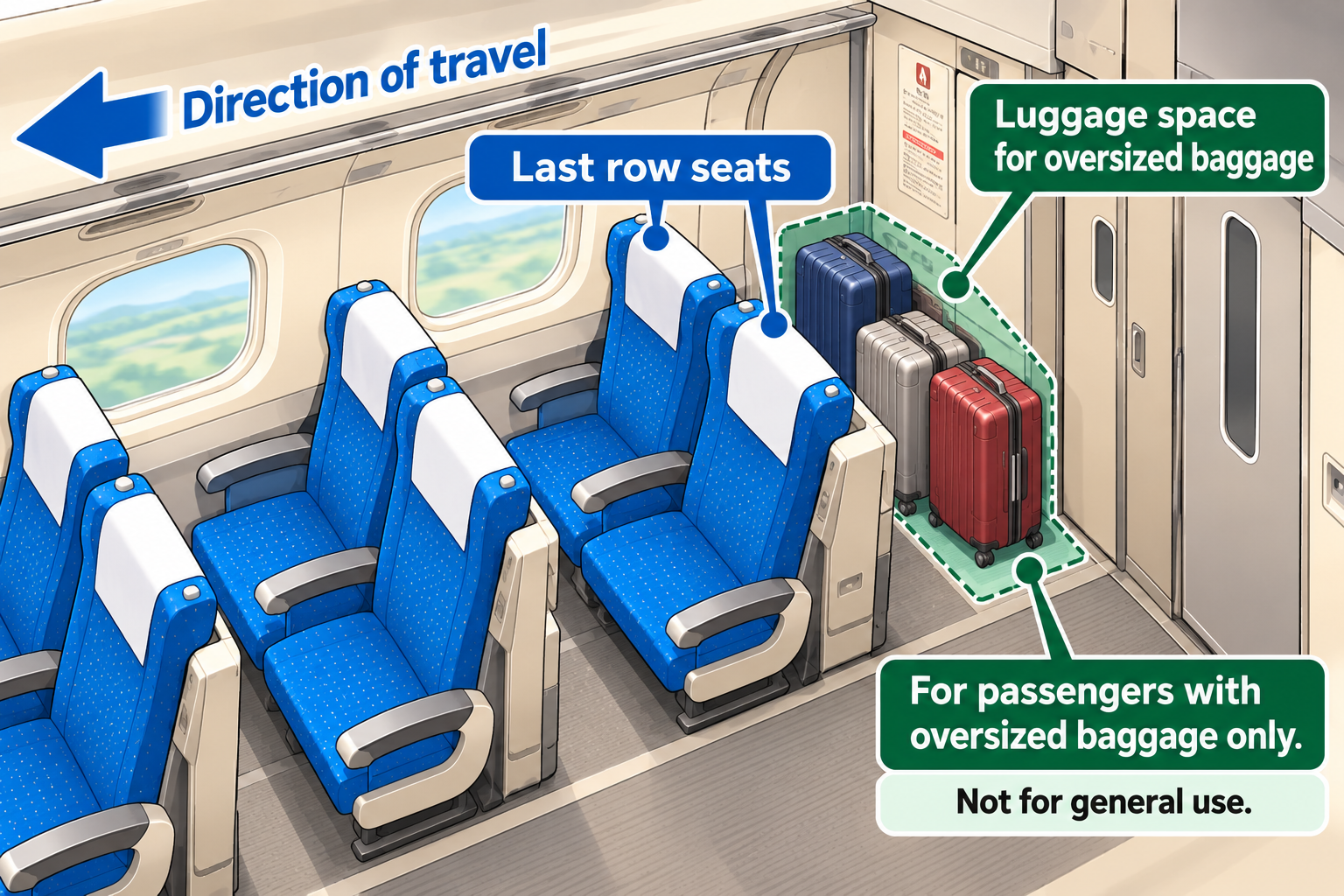

There are only a limited number of seats with oversized-baggage space.
If your route requires a reservation for your suitcase, check availability as soon as you know your travel date.
Do the Same Rules Apply to the Tohoku, Joetsu, and Hokuriku Shinkansen?
No.
The oversized-baggage seat reservation system described above doesn't apply to every Shinkansen line in Japan.
According to JR East's official guidance, you don't need to reserve a special seat just to bring large baggage on the Tohoku, Hokkaido, Joetsu, Hokuriku, Akita, or Yamagata Shinkansen.
The usual hand-baggage allowance is up to two items, each weighing no more than 30 kg, measuring no more than 250 cm across three dimensions, and no longer than 2 meters.
However, the availability and layout of luggage storage differ by train.
Check the Oversized Luggage Guide on JR East's official website to see what storage facilities your train has.
Shinkansen FAQs and What to Do If Something Goes Wrong
When riding the Shinkansen, you may run into questions about tickets, changing reservations, or other unexpected situations.
Here are some common points of confusion for international visitors, along with what to do.
Can I Ride Without a Reservation If I Have Enough Money on My Suica?
You generally cannot board the Tokaido, Sanyo, Kyushu, or similar Shinkansen lines simply by using the money stored on your Suica.
With Smart EX, you can link an IC card to your Shinkansen booking and use it at the ticket gate.
In that case, you've already paid for the Shinkansen when you booked, so the fare isn't deducted from the IC card's balance.
JR East's "Touch de Go! Shinkansen" is different: it lets you pay from your IC card's stored balance for non-reserved seats and certain other eligible travel on designated routes.
Regular Suica, PASMO, and ICOCA cards need to be activated for this service the first time you use it, but Welcome Suica Mobile works without that initial activation.
Before using the service, check whether both your boarding and arrival stations are covered in the "Operating Area" section of JR East's official English guide.
For a regular transportation IC card, activate "Touch de Go! Shinkansen" at an eligible JR East ticket or charging machine, add enough money to the card, and then tap it at the Shinkansen gate.
Just because you use Suica for regular trains doesn't mean you can tap it and board any Shinkansen.
Choose the right method for your route: a ticket, an advance booking, or "Touch de Go! Shinkansen."
What If I Miss My Reserved Shinkansen?
If you realize you won't make your train, change your booking before the scheduled departure time using the booking website.
If you've already collected paper tickets or can't make changes online, show your ticket to a station staff member and ask for help.
With a standard Smart EX reserved-seat ticket, you can generally take a non-reserved seat on a later train on the same day, even if you miss your booked departure.
However, you cannot use a reserved seat on that later train.
Some discounted tickets don't allow you to take a later train after missing your original one.
Also, if you're carrying a suitcase that requires a seat with oversized-baggage space, you cannot take a later train in a non-reserved seat.
Ask station staff for assistance and purchase another reserved-seat ticket that accommodates your baggage.
If you booked through Smart EX, check the conditions for missed trains in the official FAQ (English).
Can I Change My Train or Seat After Booking?
With Smart EX, you can generally change a booking before your reserved train departs, provided you haven't entered through the gates using your QR ticket or IC card and haven't collected paper tickets.
Conditions vary by ticket type, and you may need to pay a fare difference.
In Smart EX, open the relevant booking under "My Trips" and select "Change."
The official Smart EX booking change guide (English) explains how to do it.
Cancellation or refund fees may apply.
Do Children Need Shinkansen Tickets?
As a general rule, children aged 6–11 pay child fares, while passengers aged 12 and older pay adult fares.
Child basic fares and express fares are generally half the adult price.
Children aged 5 and under may travel free when accompanied by an adult or another eligible passenger, but a child ticket is required in certain cases, including when you reserve a separate seat for the child.
When booking as a family, make sure you enter the correct number of adults and children.
There are exceptions based on school enrollment and age. For the details, see "Adults and Children" on JR Central's official website.
Can I Ride Any Shinkansen with a JAPAN RAIL PASS?
The JAPAN RAIL PASS covers many JR Shinkansen services, but you cannot ride Nozomi or Mizuho with the pass alone.
To use either of these services, you must buy a separate "NOZOMI MIZUHO Ticket" before boarding.
If you already have a pass, check the conditions and additional charges on the official JAPAN RAIL PASS page, "Use of NOZOMI/MIZUHO trains", before making your plans.
Final Tips: Choose a Reserved Seat and the Boarding Method That Works for You
You don't need to memorize every detail of the Shinkansen system before your first trip.
- Plan your route: Use Google Maps or a similar app to check your Shinkansen departure and arrival stations and train name.
- Choose your seat: If you're unsure, go with an ordinary-class reserved seat. Measure any large suitcase before booking.
- Buy or book your ticket: Use a station reserved-seat ticket machine or a JR booking service that covers your route.
- Check how you'll enter: Find out whether you'll use paper tickets, a QR ticket, or an IC card linked to your reservation.
- Board your Shinkansen: Match the departure board with your ticket or booking, then find the correct car and seat.
Before boarding, check your ticket's conditions and the station departure board so you head to the right train and car.

Once you know which ticket you have and how to board, your first Shinkansen trip doesn't have to be stressful.
Enjoy exploring Japan! Woof!
More Guides to Getting Around Japan



Ready to plan your trip?
Find flights, hotels, transportation, tours, and attraction tickets below.
Flights
Search Flights to Japan
Hotels
Find Hotels in Japan
Airport Transfer
Book an Airport Transfer
Private Car Charter
Travel with a Private Driver
Tours & Experiences
Explore Tours in Japan
Attraction Tickets
Find Tickets in Japan

Explore tours, experiences, and attraction tickets to discover even more ways to enjoy Japan.
Why not take a look and see what’s waiting for you in Japan?